





How to choose an outdoor video camera?
Most people who are thinking about buying street CCTV cameras are faced with a lot of confusing questions:
– Which cameras should I choose?
– What is the difference between IP and AHD cameras and which standard to choose?
– What accessories are required for a video surveillance system besides the camera itself?
– What are WDR, DNR, POE?
– How not to make a mistake with the choice of matrix?
– Will wireless wifi cameras work adequately?
– Which resolution to choose 2, 4, 5 or 8 megapixels and how much difference do they make between them?
We will also provide recommendations on specific models in 3 different price categories from budget to premium. All references will be at the end of the article.
This article has been prepared for you by ISON, the #1 brand in the off-the-shelf video surveillance market. Visit our website www.ison-cctv.com where you will find everything you need for video surveillance systems from cameras and DVRs to connectors and uninterruptible power supplies, as well as more than 1200 types of ready-made video surveillance kits for any task and budget, which are designed for installation by the average user and installed on the principle of take out of the box – plug into the socket. ISON brand is Japanese quality and the highest technology!
What is WDR?
WDR is a technology that improves the quality of footage in poor or inappropriate lighting conditions. In essence, buying a CCTV camera without this technology is money in the wind, because wherever you do not put your camera several times a day it will either get sunlight or on the contrary fall shadow and at these moments all the faces in the frame will be darkened and license plate numbers are unreadable.
In the last few years, the concepts of WDR and REAL WDR have also started to be distinguished. The concept of REAL, i.e. real began to be written by world manufacturers after a large number of Chinese brands, in an effort to cheapen their products, began to realize this technology in, to put it mildly, poor quality. I.e. a person bought a camera that was written as having WDR technology, but in fact this technology did not solve the problem of poor or incorrect lighting.
When buying a camera, be sure to ask the seller if the WDR technology on board is REAL or better yet, read reviews or analyze the brand you are buying to see how much it can be attributed to the concept of a quality manufacturer. In the industry of manufacturers of video surveillance systems there are as well as, for example, in the industry of automobile manufacturers of their own symbols of quality and manufacturers who strive to maximize the cheapest price correspondingly cheapen the quality of components. Symbols of quality video surveillance systems are traditionally brands SONY, ISON, BOSCH or for example Panasonic.

Returning to the topic of WDR we should also note that there is a more budget analog of WDR technology – DWDR, most often it is found in AHD surveillance cameras. How much worse it will be compared to WDR depends again on the quality standards of a particular manufacturer. If you choose for yourself ISON CCTV cameras then WDR technology here will always be only REAL, and DWDR technology will be 10% easier than WDR. If you choose for yourself cameras of another brand then do not forget to clarify these points with sales consultants.
What are the differences between IP and AHD video surveillance?
These are 2 different standards between which there are no significant differences when it comes to domestic applications? For example, video surveillance for home and cottage, car or warehouse. But if you have, for example, the task of deep analytics and connection to the server, only IP cameras will cope with this task.
These are such tasks as, for example, to put a camera at the entrance to the factory, connect it to a server, enter a list of license plate numbers of factory employees into special software and program the operation of the barrier so that it opens only when a car from the list has arrived. I should add here that the cost of such a solution, including the server, software and all components, usually costs several hundred thousand rubles, which also emphasizes its non-domestic use.
The pros of IP cameras are that the quality of filming they have a little better in terms of detail, but at the same time they cost a little more. The pros of AHD cameras are more favorable price, the same functions and possibilities in terms of domestic use from motion sensors to viewing from the phone and good quality of filming, provided that we are talking about a quality brand.
Another difference between the two standards that you need to know about is the cable. IP video surveillance is twisted pair, AHD is coaxial cable. I should add that now you can connect AHD cameras on twisted pair with the help of special twisted pair adapters. This is convenient in cases where you, for example, laid in your house twisted pair cable, but then decided to put a more budget AHD video surveillance system.
On many forums dedicated to video surveillance systems can be found advice that IP video surveillance is more difficult to install and configure because of the need to prescribe IP addresses. But more than 3 years as a company ISON has solved this problem by offering its customers ready video surveillance systems with technology EASY INSTAL which come with a full set of all necessary settings and presets, formatted hard disk and ready cable with connectors. That is, choosing such a system you do not need to configure or crimp anything, just take everything out of the box and plug it in. I should add that all AHD systems of the same brand also come with the same technology.
If you want to delve deeper into the differences between IP and AHD video surveillance, we recommend checking out our video IP or AHD video surveillance 9 differences. For myself, I would recommend that you consider both IP and AHD video surveillance systems when purchasing.
What is DNR?
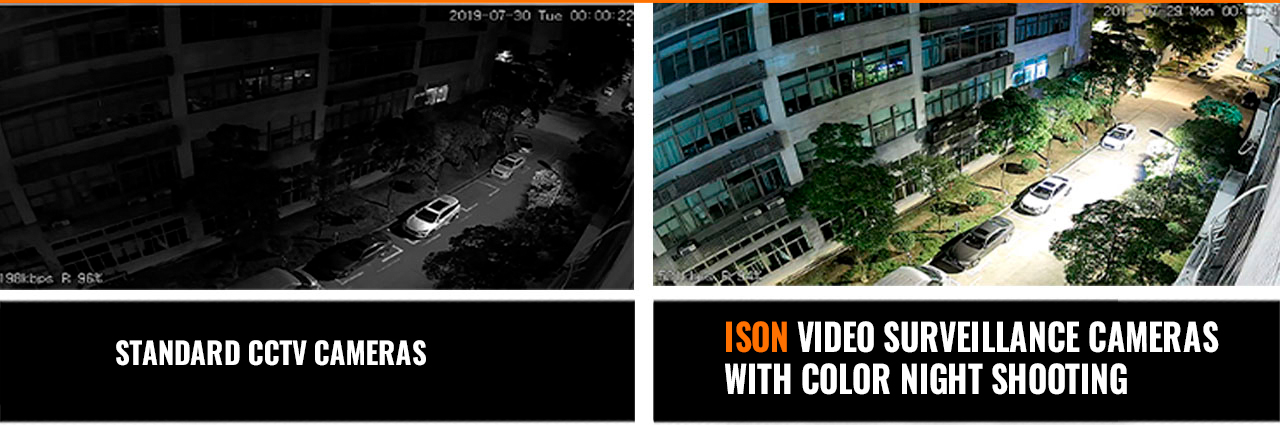
DNR is a technology in AHD video surveillance systems that ensures that they operate without noise, i.e. ripples, in nighttime shooting conditions. Cameras without this technology will be uninformative at night, as the ripples will cause unreadable license plates and poorly distinguish people’s faces.
What is POE?
POE is a technology in IP video surveillance systems that provides both power and video transmission over a single cable. If you choose for yourself ISON video surveillance system then absolutely all ISON IP systems come with POE technology on board as well as all ISON AHD systems come with DNR technology on board. If you choose for yourself a camera of another brand, check with sales consultants about the presence of these technologies in their products.
What is a hard disk drive and which one to choose?
And what is a motion sensor in CCTV cameras, how does it work and how does a regular sensor differ from a smart sensor?".
A hard disk is a device that is installed in the DVR and is used for recording. To understand what disk size you will need, you need to determine what cameras you will put, how many, what resolution they will be, what brand, whether they will have a motion sensor on board and what compression standard they have.

Standardly most video surveillance systems come with H.264 compression codec, but for example all ISON video surveillance systems come with H.265 codec, which means that your cameras will consume 2 times less hard disk space at the same quality of shooting.

Using the example of ISON surveillance cameras, I can give you an approximate amount of memory consumption for all kinds of cameras:

- The 2 megapixel cameras consume an average of 1gb per hour per camera;
- 5 megapixel cameras consume an average of 1.5gb per hour;
- 8 megapixel cameras with 4k resolution consume an average of 1.8gb per hour.
Also, you can record not constantly, but by motion sensor. Firstly, it helps to increase the period of your archive, and secondly, it is elementary convenience when viewing the archive, i.e. if there is an emergency at your facility, you will not need to review the entire multi-day archive from each camera, because you will immediately see when and at what time there was movement at your facility.
Also, for example, in video surveillance systems ISON motion sensors are intelligent, ie, they can be customized in sensitivity, set the area of sensor operation, as well as you can receive notifications on your smartphone about the operation of the sensor, located anywhere in the world.
To illustrate the definition of the archive, let’s look at examples on specific models. For example, a video surveillance system with 4 cameras 5 megapixels ISON GREKO PRO, a popular option in the middle price segment with a SONY sensor, motion sensors and budget hard disk for 1 terabyte, ie 1000gb will have an archive of about 30 days, subject to recording on the motion sensor and the intensity of movement of the usual private house.
If for some reason you want to record only continuously, the archive will be about a week, although we do not recommend recording in this way, because there is no point in writing nothing. The same system with 8 megapixels ISON GROT X with the same sensor, motion sensors, zoom and the same disk will have an archive of about 3 weeks by motion sensor.
Additionally, I would like to note that ISON models specifically work in such a way that after these 3 weeks are over, the disk will gradually overwrite itself. If you are planning to install cameras of another brand at your facility, do not forget to clarify all the above nuances with the seller.
How not to make a mistake with the choice of street camera sensor?
This is one of the most important questions. The matrix is what is inside the camera and its quality determines both the quality of filming and durability and correct operation. In an effort to make their cameras as cheap as possible, many manufacturers mislead their customers by offering to buy a 5 or 8 megapixel camera at a low price, which is due to the low quality of the sensor. Because of this, a 5 or 8 megapixel camera may actually have worse quality than cameras from the 90’s.
This is a current problem in the video surveillance market.
We recommend choosing cameras with SONY sensors and all their derivatives from Sony EXMOR to SONY EFFIO. These sensors give the best price/quality ratio. To put it simply, anything cheaper has questions about quality and reliability, and anything more expensive has questions about pricing and the feasibility of such a purchase.
In addition to the quality of shooting, the sensor also determines the reliability of the camera. Simply put, 90% of all camera failures and defects are related to the sensor. A good camera with a good sensor should last 10 years with 24/7 operation.
I should also note that, as in the case with WDR fakes, there are also fakes for SONY sensors. Unscrupulous Chinese manufacturers noticed that cameras with SONY matrixes became one of the most popular on the world market and began to counterfeit them, which again caused resentment among consumers who bought a camera with the inscription SONY matrix, but in fact the picture was fuzzy and rippled. After that, manufacturers supplying their cameras with original matrixes began to add a note SONY original matrix to the characteristics.
If you choose for yourself ISON cameras when selecting in the filter, check the SONY original sensor box to see cameras with these sensors.

If you choose for yourself a camera of another brand, then be sure to check with the seller about the origin of the matrix of the model you like.
What is cloud recording, how much does it cost and for how long is it necessary?"
And also how to organize uninterrupted operation of cameras during power outages and what is needed for that?
Recording in the cloud is a paid technology that allows you to record on a remote server. It is convenient in cases when you, for example, are afraid that your video surveillance system will be stolen and in case of recording in the cloud you will have an archive.
But such a service implies a monthly subscription fee, and not small from 300r per month for 1 camera. That is, for example, the archive for a system of 8 cameras will cost about 2500t.r. per month for the smallest weekly archive or about 30t.r. per year.
At the same time, there is a quick trick how to get the same duplication effect and not pay a subscription fee. The developers of ISON video surveillance systems have considered the desire of many customers not to pay subscription fees to cloud services and offered a technology that allows you to duplicate the recording from one video recorder to another.
If by way of example, let’s assume that you have installed the above mentioned system ISON GREKO PRO and if you are afraid that your recorder will be stolen, you buy another one like the kit video recorder, install it on another object at home, at work, at the cottage, connect both recorders to the Internet and set up duplication of the archive.
I would like to point out that in order to perform such an operation as duplication of recordings to the cloud or to another recorder, you need a good Internet channel. If we take as a basis the same system Greko PRO with 5 megapixels and 4 cameras, then the Internet speed should be at least 30mbit, and if we take the system ISON Grot X with 8 megapixels, then at least 45mbit.
Also, to perform such an operation as duplication of recordings to another recorder, it is necessary to have static IP addresses at both sites where DVRs are installed. If you do not know what this is, call your ISP, i.e. the company that provides Internet at your site and say that you need a static IP address and they will set it up for you.
I will also answer a popular question: “Is it possible to record in the cloud not on a paid cloud service but on a free one, for example, Yandex or Google disk?". – Alas, only special services are required for these tasks.
There is one more popular and the most budgetary way to solve the problem of possible theft of the recorder: hide it in a secret place or safe, having previously put on it uninterruptible power supply so that intruders could not de-energize your cameras.
– What components are required for a video surveillance system to function?
And also how to organize video surveillance where there is no internet?
There are 2 options here: The standard option involves a camera, a bracket for it, a mount, a cable with connectors, a video recorder with a hard disk, as well as power supplies.
ISON is the #1 company in the market by the number of ready-made video surveillance systems sold. You can get acquainted with the catalog of ready-made systems on the site www.isoncom.ru in the section ready-made sets, on the left in the filter put the number of cameras you need, choose the resolution you need or do not choose anything to consider all options.
Also you can choose the type of camera, outdoor or indoor or if for example you need a combined system where part of the cameras will be outdoor, and part of the indoor, then choose any system you like and in the configurator above the buy button you can choose to replace the number of cameras you need on the indoor.
That is, for example, you need a system of 4 cameras with three outdoor and one indoor camera, choose the appropriate option and in the configurator select the replacement of 1 camera on the inside.
Also in the same configurator for each model of a ready-made video surveillance system, ISON offers you the possibility to select replacement components if necessary. For example, you need a system for expansion. For now you want to put 4 cameras, but in the future you plan to put 3 more, in this case, choose to replace the DVR with an 8-channel. Or you are not satisfied with the standard 1TB hard disk, which provides an archive in your system, you can also choose to replace the disk with a 2, 3, 4 or 6 terrabyte, thus increasing the size of the archive to several months.
You can also choose to replace cable coils with longer ones in the configurator.
Additionally, in the main filter you can select the presence of the function of viewing from the phone, as well as support for 3g/4g for objects where there is no wired internet, the presence of motion sensor, viewing angle, the presence of WDR technology, of course it will be real wdr, MATRIX, the distance of shooting in meters, the presence of zoom, and so on.
Also, on the site in the lower left corner there is convenient assistant, clicking on which you will be asked to answer 10 simple questions about your object and you immediately see all the options that will suit you.
The above composition is basic, ie it is enough for the functioning of video surveillance system, but there are additional peripherals that are often purchased together with the system, such as uninterruptible power supplies, they provide power to the system during power outages from a few minutes to a few hours depending on the chosen model of uninterruptible power supply, mounting boxes and bases for mounting cameras.
Mounting boxes are standard plastic boxes where the camera connector is hidden from moisture. Bases for mounting cameras is a more versatile device in which you can not only hide the connector but also fix the camera on it, routers to connect the DVR to the Internet via 3G/4g modem. If your facility does not have wired Internet, you will separately purchase the USB modem itself, they are sold only in cellular shops also you will purchase a specialized router, signs is video surveillance, microphones, monitors and so on.
The second variant of kit assembly assumes only a camera with a slot for SD card and its direct connection to the Internet. In this case you will need a camera with a bracket, mount for it, SD card, power supply and a cable with connectors for connection to a router. This method is suitable for small objects, where 1 camera will be enough, for example, a construction site and a small archive of a few days. I would also note that this method is considered more complex in terms of self-installation, because it requires a number of IP settings on the camera and router to which it will be connected. If you are interested in this method, then be sure to watch our video “How to connect an IP camera in all ways".
Which resolution to choose 2, 4, 5 or 8 megapixels and how much they differ between them?"
And what is HD, FULL HD, 2K and 4K?
Today there are many camera options from 2 to 8 megapixels. There is no exact answer to the question of how many megapixels to choose for a private home, for monitoring a car or for example, for a warehouse, because in this matter everything rests on the budget.
If your budget allows you to take a camera at 8 megapixels, today it is the best cameras and the picture will be as clear as possible, if your budget does not allow then medium price variant is 5 megapixels, budget options are from 2 to 4 megapixels. Links with prices for options from all 3 categories will be in the description.
Here it is worth noting the above-mentioned point about matrixes, it is important to look not only at the resolution in megapixels but also at the matrix with the lens, because to buy a camera at 8 megapixels with a low-quality matrix does not mean to buy a good camera.
Often we are also asked whether the quality of cameras with 4 and 5 megapixels is very different. The answer is simple: 1 megapixel is 1 million pixels, i.e. 1 million points on the screen, i.e. in cameras with 5 megapixels, 1 million points more and it is 20%, i.e. a camera with 5mp will see better than a camera with 4mp by 20%, respectively a camera with 8 megapixels will see 2 times better than a camera with 4 megapixels, of course, provided that we compare cameras with the same sensors, lenses and the same brand.
Here we will answer the question of what HD, FULL HD, 2K and 4K are. These are terms to define essentially the same resolution.
HD is the equivalent of 1 megapixel, this resolution has already been removed from production by almost all brands as obsolete and low quality video surveillance;
FULL HD is a 2 megapixel, budget option;
2K is 3 to 5 megapixels;
4K is an 8 megapixel premium option;
Will wireless Wi-Fi cameras work adequately and what are the disadvantages of this type of camera?
Wireless Wi-Fi cameras have a disadvantage that is clear from the name – Wi-Fi transmission, which has its own limitations. The situation is about the same as with your phone: when you sit at home you have good Wi-Fi coverage, but as soon as you go out into the entrance and the connection is lost. I.e. such signal is strongly jammed first of all by walls.
The second disadvantage of such cameras is the price, Wi-Fi cameras by definition are more expensive than wired cameras, which will nullify the attempt to save on the purchase of cable. The third disadvantage of wireless cameras is that at the place of installation must be an outlet, from which the camera will receive power. The fourth disadvantage is the possibility of jamming the Wi-Fi signal, thereby disabling your cameras.
But they have a significant plus is the lack of cable between the recorder and the cameras.
From decent models I can recommend systems ISON AIR they have a built-in system of protection against all kinds of interception and jamming, as well as its own built-in Wi-Fi module allows you to receive a signal from the cameras without the use of extraneous routers, which again strengthens their signal and improve protection against jammers.
Such systems work with signal transmission up to 90 meters in an unobstructed environment, such as a production hall where there are no walls and other Wi-Fi networks. If we are talking about a standard object private house, such a system will work stably with 1 or 2 walls.
Be sure to check out our video review of these models, where we talked in detail about which objects this system is suitable for and which are not.
ISON also has industrial wireless systems designed for large facilities where there is a need to transmit a wireless signal for kilometers.
Also, don’t forget to watch our video review and testing these systems to see if they will fit your facility or not.
What is the difference between a fixed lens and a varifocal lens, and which one should I choose?
How does the electronic zoom work and can it be controlled remotely?
A fixed lens is a standard lens without zoom, a varifocal lens is a lens with zoom pointing capability.
Let’s break down all the options from the most budget-friendly to the most expensive:
- The most budget option is a 3.6mm lens, its disadvantage is not the maximum angle of view, which depending on the matrix will be from 60 to 100 °;
- Next comes a 2.8mm fixed lens, depending on the sensor it gives a viewing angle of up to 120°. For example, in the above-mentioned systems ISON AIR or ISON GREKO PRO are just such lenses, which give a viewing angle of 120 °. This is the maximum viewing angle for street CCTV cameras, more there are cameras only on 360° fisheye but they are very specialized and suitable only for the format of shopping centers.
- Then comes variofocal lens 2.8-12mm, which gives the ability to point 4-fold zoom, the disadvantage of such a lens is that the zoom control here is made by hexagon on the camera itself.
- Then there’s one of the most popular lenses these days, the electronic. This is the same vari-lens, only it can be controlled remotely from a phone, tablet or computer anywhere in the world. Such lenses are equipped, for example, with cameras of systems ISON GROT X, ISON KOVO PRO, ISON OZON and many others.
- And the most expensive are rotating PTZ lenses, in addition to the zoom on board such cameras also rotate 355° left/right, up/down. Also if we are talking about PTZ cameras ISON, they come with patrol tour technology, i.e. you can set automatic rotation of the camera on your object.
Which camera to choose to avoid winter and fall fogging?
And what is IP 66 and which camera to choose for frosts below -40°?.
– Periodic fogging of CCTV camera lenses is another headache for regions with variable climate.
Many manufacturers do not provide moisture absorbers in the camera housings, also such a problem can arise simply because of the poor quality of the housing and not complying with IP66 standards, standards of dust and moisture resistance.
In fact, to understand whether your camera will fog up, whether it will hold the heaviest rain and whether it will work in extreme cold can only be based on the feedback of people who have such a camera has stood for at least a year.
Regarding the brands Bosch, ISON, SONY we can say that they are one of the few brands that have presented more than 5 years ago for the inhabitants a solution to this problem in the form of built-in moisture removers, it is a special substance inside the body of cameras. Such cameras will work without fogging in any weather and in any climate.
Regarding outdoor ISON cameras, I would like to add that they will work at temperatures down to -60°. As for Bosch and SONY cameras or other brand cameras, please check the temperature mode of operation with the sellers for specific models, because different outdoor models may be different.
What is the difference between conventional nighttime infrared illumination and LED illumination, and which one should I choose?
LED illumination is a more modern format of night infrared illumination, which replaced the conventional illumination and is characterized by a higher quality of infrared light and reliability.
Because the typical problem of conventional IR illumination based on r5 infrared diodes, which we have already talked about in our reviews, is extremely low service life. In fact, by the end of the first year of operation of such cameras, the night illumination will already be partially burned out.
Ask the seller what kind of night illumination on the cameras you like is old or new LED. All ISON cameras as of 2020 already have LED backlighting.
 Turkish
  English
  Italian
  Spanish
  Arabic
  Portuguese
  French
  German